WordPress, combined purge of Cloudflare + SpinupWP caches
Introduction
Caching is one of those things we all rely on, whether we love it or not. It keeps modern websites fast and efficient, but clearing multiple caches can sometimes feel like jumping through hoops.
This article introduces the Webreact integration for SpinupWP and Cloudflare plugin that links two services so that when you purge a site or specific URL in SpinupWP, the matching cache in Cloudflare is cleared automatically.
Prerequisites
Before getting started, make sure you have the following:
- A site managed through SpinupWP, with the official SpinupWP WordPress plugin active. This ensures WordPress can trigger purge events.
- A Cloudflare account with your domain added as a zone, plus your API key or token and the Zone ID for that domain.
Finding Cloudflare Zone ID and setting API Token / Key
Zone ID
- Log in to your Cloudflare dashboard.
- Select the domain you’re working on.
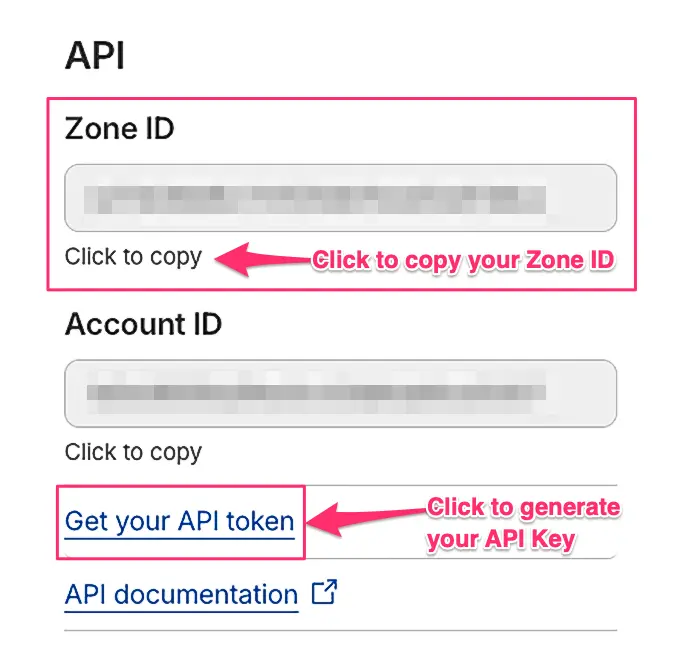
- On the Overview page, look to the right-hand side (or near the bottom on smaller screens) for the panel showing your Zone ID (see example image below.)
This ID links the plugin to the correct domain.
Setting API Token / Key
Just below the Zone ID, you’ll find a link labelled “Get your API token.” Follow this to create an API token or key. Cloudflare will only show it once, so be sure to store it somewhere safe. A secure note in a password manager like 1Password is ideal.
Connecting WordPress to Cloudflare
Once active, you connect to Cloudflare via the settings screen.
- In wp‑admin, go to
Settings>SpinupWP Cloudflare. - Enter your Cloudflare API key or token, along with the Zone ID you gathered earlier.
- Save your changes.
How automatic purging works
With the credentials confirmed and SpinupWP active, the plugin handles cache clearing for you:
- Full-site or global purges in SpinupWP trigger a full Cloudflare purge for the matching domain.
- Single-URL purges in SpinupWP send targeted URL purges to Cloudflare instead of wiping the entire cache.
This keeps your server cache and Cloudflare’s edge cache nicely in sync with no manual scripts or webhook juggling required.
Using the Admin Bar purge option
Sometimes you’ve made a quick change and need it live straight away. For those moments, there’s a handy manual option:
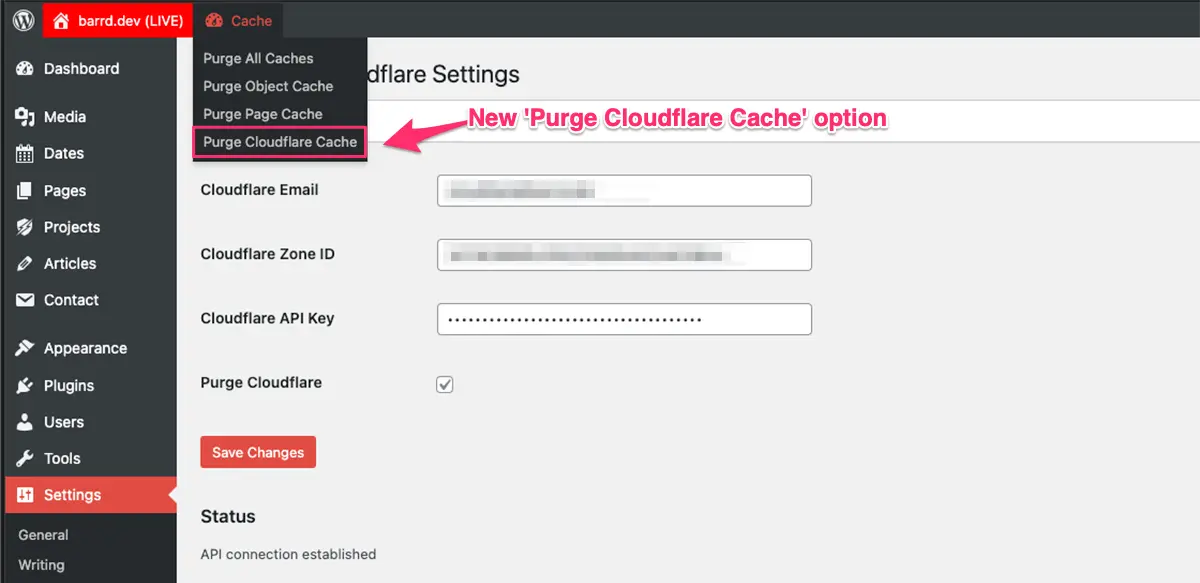
- While logged in, visit the front end of your site.
- Click on the
CacheAdmin Bar menu item. - Look for the
SpinupWP Cloudflarepurge options.
This gives you reliable “just clear it now” functionality right where you need it.
Final thoughts
Managing multiple caches across multiple sites can easily become repetitive and time-consuming. This plugin streamlines the whole process, saving you time and reducing the chance of missing a cache somewhere along the way.
A big thanks to the team at Webreact for creating such a helpful tool!
// End of Article
Article Information
Further Reading
- Cloudflare Homepage (cloudflare.com)
- Plugin Authors Homepage (webreact.nl)
- Plugin Homepage (wordpress.org)
- SpinupWP Homepage (spinupwp.com)
- SpinupWP Plugin (wordpress.org)
- WPackagist Page (wpackagist.org)
About Dave A.K.A. 'barrd'
