WordPress, conditionally dequeue 3rd party plugin JavaScripts
Introduction
There may be times you’ll find a third party plugin loads a script (or more than one) at times when it’s not needed.
Bloat aside, this can penalise Core Web Vitals* scores meaning a lowering of the SEO value of your post. Overall you’ll be making the webpage more performant, which is good for everyone.
*Core Web Vitals – Largest Contentful Paint
When checking your page in Lighthouse, Pagespeed etc, you may get a warning that scripts requests are blocking the page’s initial render, which could delayLCP (Largest Contentful Paint.)
Quick overview and explanation
For the purpose of this article I’ll demonstrate dequeueing two JavaScripts from two different third party plugins that both only need to be active on one page.
It’ll be worth your while to do some research into each plugin to ensure there isn’t already an inbuilt hook solution or setting variable that can do the job for you!
The plugins I’ll be working with in this demo are Contact Form 7 (which as outlined in the tip above already has hooks available to dequeue styles & scripts) and Cloudflare Turnstile.
Lets say I only have one contact form on the site and have no other needs for either plugins JavaScript other than on the Contact Page.
Caveat
Something to be aware of is that we’re assuming the plugin’s authors properly enqueued the scripts in the first place, otherwise the task would be more difficult, if not impossible.
Locate the script(s) in DevTools
Whether you use Developer Tools or view the pages source, it makes no difference, whichever suits your workflow.
Finding the IDs
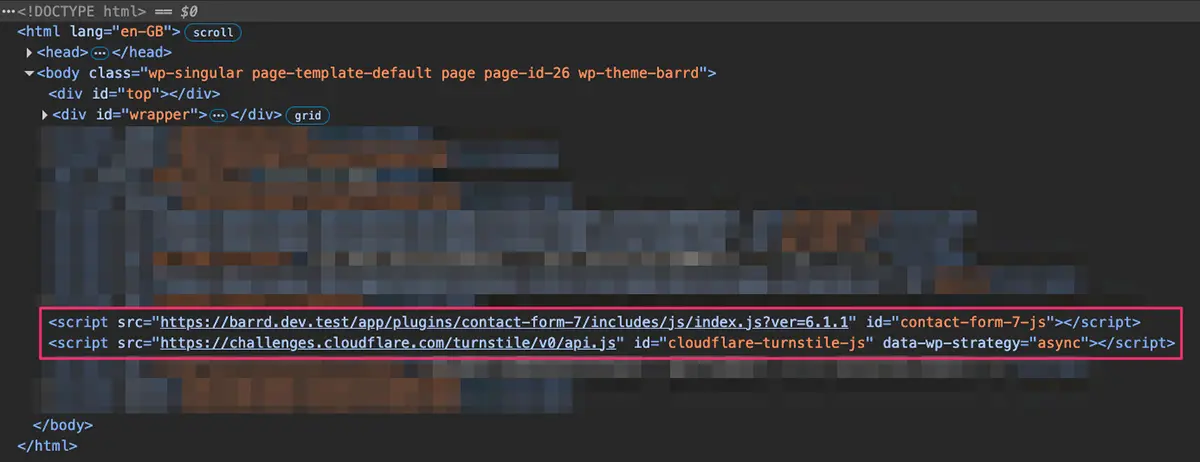
The section highlighted in a red box (image above) contains calls to the two JavaScript files we want to dequeue. The part we’re interested in at this point are their IDs e.g.
id="contact-form-7-js"id="cloudflare-turnstile-js"
Looking good so far
The fact that both have IDs and they both end in -js is good news, looks like they were properly enqueued. WordPress automatically adds the prefix -js as part of enqueueing process.
With the knowledge that the -js part is added by the CMS we can move forward knowing we can safely remove that and concentrate on the parts that matter e.g.
contact-form-7cloudflare-turnstile
These will form the $handle parameters passed to the wp_dequeue_script() function.
Choosing our conditional(s)
WordPress thankfully comes pre-armed with a handy selection of Conditional Tags for checking everything from is-a-page to templates, categories, is-an-archive etc… when used well and combined, the list of scenarios you can conditionally set are almost endless.
Back to our demo example
To keep this simple, getting back to the original purpose, we only require these scripts when on the Contact Page, so we’ll use the is_page() function and pass in the Page ID as the $page parameter.
To find the ID of a page or post, just open it in the editor and look at the URL in your browser, right after post= you’ll see the ID number.
At last, the code
The example below is standalone in as much as I’ve wrapped it in an action, namely wp_enqueue_scripts() (which is required but you could add the dequeue_contact_scripts()function to an existing piece of code if appropriate.)
/**
 * Remove Contact Form Scripts
 *
 * Dequeues CF7 & Cloudflare Turnstile scripts on all pages except Contact Page
 */
function dequeue_contact_scripts() {
  if ( ! is_page( xxx ) ) { // <- Swap xxx for the page ID.
    wp_dequeue_script( 'contact-form-7' );
    wp_dequeue_script( 'cloudflare-turnstile' );
  }
}
add_action( 'wp_enqueue_scripts', 'dequeue_contact_scripts', 100 );
Since we want to conditionally include everything except the Contact Page, we’ll use the PHP ‘not’ operator (!) to ensure that the page ID checked by is_page() is the only one that does not include the wp_dequeue_script() functions.
Final thoughts
It all seems simple enough and when plugin authors do enqueue using the proper methods, the process can be quick and painless.
I used a minimalist example but with some thought and thorough testing, making use of the Conditional Tags mentioned earlier, you could probably achieve any result you wanted.
// End of Article
Article Information
Further Reading
- Understanding Core Web Vitals (developers.google.com)
- Contact Form 7 Plugin Page (wordpress.org)
- Simple Cloudflare Turnstile Plugin Page (wordpress.org)
- WordPress wp_dequeue_script() Docs (developer.wordpress.org)
- WordPress Conditional Tags (codex.wordpress.org)
- WordPress is_page() Docs (developer.wordpress.org)
- WordPress wp_enqueue_scripts() Docs (developer.wordpress.org)
About Dave A.K.A. 'barrd'
