Remove unused PHP versions from Laravel Herd
Introduction
As a relatively new piece of software Herd is under rapid development and there are a few options that are not yet available. One of them is the ability to remove unused versions of PHP using the User Interface (UI.) The following instructions outline the manual removal process via the Command Line Interface (CLI.)
The removal process
To check which versions are active, click on the top-level menu (if you have Herd preferences set to display icons in the menu), then navigate to Herd > Settings > PHP. This will provide details on available versions, with installed versions displaying their respective version numbers.

In this example I’ve used PHP version 8.1 (8.1.28 in the image above.) Begin by quitting Herd, then execute the following after editing to the required version you want to remove.
The Code
I have used tildes (~) as shortcuts to a users Home Directory. You could use the actual path (/Users/<user_name>/) or the $HOME variable if you are more familiar or comfortable using those.
rm ~/Library/Application\ Support/Herd/bin/php81 &&
rm ~/Library/Application\ Support/Herd/bin/php81-fpm &&
rm -r ~/Library/Application\ Support/Herd/config/php/81 &&
rm ~/Library/Application\ Support/Herd/config/fpm/8.1-fpm.conf
Afterward, restart Herd, and you will see in the image below that the PHP version has been successfully removed (notice that there is now an Install button available.)

Elements being removed from under ~/Library/Application Support/Herd/
Four elements will be removed from the Herd Application Support directory, required for the removal of a PHP version. This process entails deleting three files and one directory.
The elements


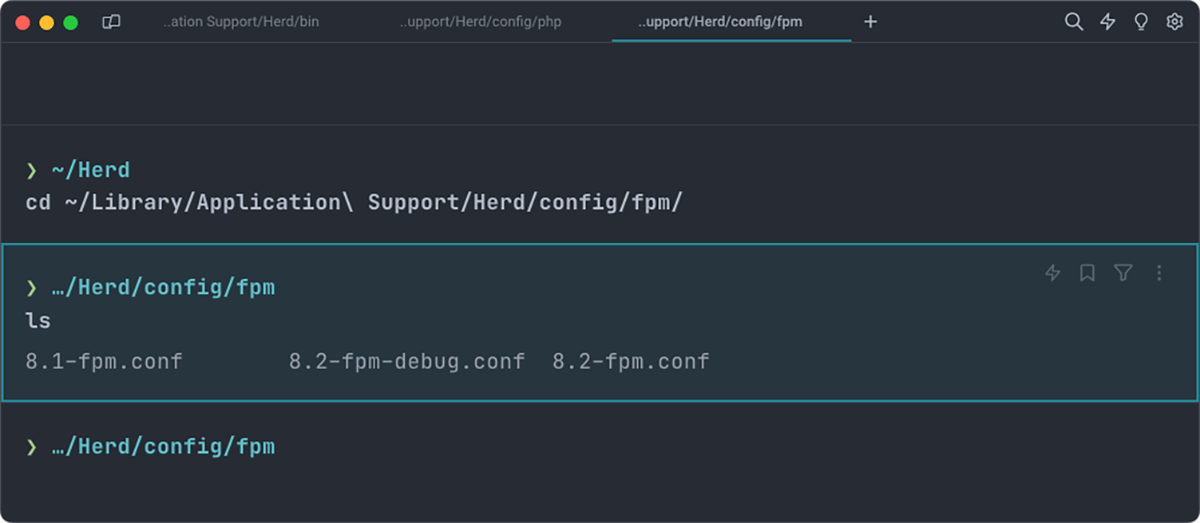
Image Index
Elements one and two (files)
Found under the …/bin/php81 and php81-fpm binaries are removed by the first two lines of code (See Image 01.)
Element three (directory)
Found under the …/config/php/81 directory will be removed by the third line of code (See Image 02.) The recursive (-r) flag is used to ensure all the contents are removed.
Element four (file)
Found under the …/config/fpm/ directory the 8.1-fpm.conf file will be removed by the fourth line of code (See Image 03.)
Final thoughts
I’m certain that this facility (PHP version removal) will be added to the UI in due course, till then this is a simple, quick and efficient substitute. Remember to quit Herd before starting so that the process is;
- Quit
Herd. - Edit the code to the version number you want to remove (e.g. 8.0 – 8.1 etc), then Copy & Paste into your
Terminalapp of choice and hitreturn. - Restart
Herd.
As a last note, this will only remove PHP versions from the Herd application, not your Operating System (OS.)
// End of Article
Article Information
Further Reading
- Laravel Herd Homepage (herd.laravel.com)
About Dave A.K.A. 'barrd'
